

*This post may contain affiliate links. Please read the full disclosure here.
Is selling ebooks a profitable side hustle?
I have read many stories of bloggers making money selling ebooks, and I thought I’d give it a try.
So I created my first ebook in 2018, and I wanted to write about my little blogging journey. Within 6 months of starting a blog, I was able to make a full-time income as a blogger.
I thought I’d lay out the strategies that took me through this remarkable journey.
I priced the book at $17.99 and made roughly $500 in my first month selling it – which I was quite happy about.
This ebook I created was more of an experiment to see if selling ebooks was even possible. While I only wrote a short 100-page ebook, you can choose to write a longer book and price it higher. This means you can make $50 or $100 in just one sale.
So how do you write an ebook and make money? What do you write about? How do you sell it?
Let’s take a look at all the answers below.
This post may contain affiliate links. Please read disclosure.
Pick an ebook topic
The first thing to do is to find a topic to write on.
Brainstorm ideas you are comfortable writing and do a little research on it.
Check out Amazon and Google to see how well these topics are rated.
For example, say you are interested in writing an ebook on “How to knit a scarf”.
First thing is to type this topic into Amazon and Google and check what ebooks come up. Read the reviews and feedback left by customers, and see what they feel the book lacks. Use this to improve your own book. Answer those questions and build on your ideas.
You can also check out online forum and discussion groups to see where the interest of the audience is. So with the “How to Knit a Scarf” example, are readers interested in materials and supplies, cost of the products used, step-by-step tutorials, specific design or patterns, or places to sell their items.
Gather as much information as you can and put them as relevant points in your ebook.
What types of books can you write?
Most ebook authors are either experienced in the field or qualified to write on the article.
If you touch on sensitive topics like health or finance, you might need a relevant qualification to put your thoughts in the book. This can also work as an advantage as readers might see you as an expert in the field – leading to more sales!
Here are a few types of ebooks you can write on:
- Cookbooks
- Tutorials
- Advice and tips
- Fictional & Non-fictional
- Personal Journey
- Inspiration & Motivation
- Christian books
- Children stories
- List-based
eBook Format
If this is your first time writing an ebook, it’s not a bad idea to buy some popular ebooks yourself and learn how it has been laid out.
Make sure you are only using these ideas as an inspiration and not copying them.
Here are some things to keep in mind when creating an ebook;
1. Apart from recipe books where you are using your own images, most other authors use licensed stock images to design their ebooks. You can use Creative Market to buy your images.
2. Choose your brand colours. If you already have an online business or a blog, you can follow the same look for your ebook or choose to experiment. Pick three or four colours to begin. These colours can be used for headings, links or as a border colour for your book.
3. Write out a one-page disclosure and copyright details.
4. Create an index to list chapters.
5. Draft out your content – you can do this in a Word document.
6. Make edits and improve on it. Send it off to be proofread, before it has been finally published.
I used an online platform called Canva to create my ebook. It’s free to use and you can play with colours and fonts to customise your ebook.
If you are writing your ebook draft on Microsoft Word, you can copy and paste it in Canva and make final adjustments.
Canva will allow you to create a pdf copy of the ebook that you can download and use to sell.
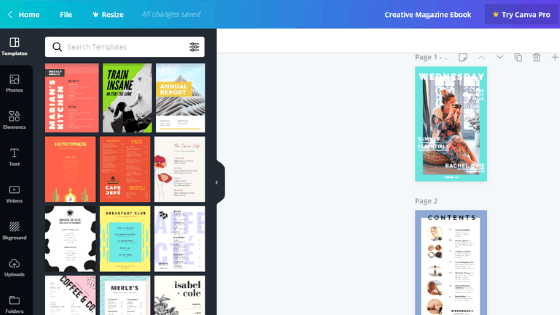
Canva is great, you have premade ebook templates that you can use to create your own ebook. Like the templates above.
Writing is the time-consuming part. The rest is a matter of tweaking the overall look of your ebook.
Timelines
This is one important question you may have.
How long does it take to create an ebook?
It fully depends on how much time you have and how many pages you want to write.
My ebook was roughly 140 pages long and I contributed roughly 2 hours a day excluding weekends and this took me over a month to finish.
I lovely playing around with designing my ebook, so it took me a lot longer than I expected. Since mine was tutorial-based I had to create step-by-step images which was a little time-consuming.
Now, if you are wondering why I haven’t linked to my ebook anywhere, its because I discontinued selling it. Which brings us to the next topic.
What are the drawbacks of selling an ebook?
Updating.
Yes. Keeping your ebook updated.
That’s one thing that needs doing especially if you are doing educational ebooks.
If you are writing on topics like cooking, tips and advice, craft tutorials or motivational ebooks, you might not have to make any updates. But for study-related ebooks, it’s best if they are regularly updated and not with an outdated strategy.
Since my ebook came under educational resources, I wasn’t able to keep up with updating it. I was also making more income from my blog through affiliate marketing and ads that I decided to stop sales of my book.
Best Place to Sell ebooks online
Creating a small website and selling your ebook on it would be the best way to do it.
You can create a simple blog for just $11.99 a month with Lyrical Host. They are a very friendly and reliable hosting service provider and is what I use on this blog.
Here are two reasons why I love them:
- They have a 30-day money-back guarantee, so if you don’t wish to proceed with your blog within 30 days of your purchase, you get your refund.
- You can cancel anytime with all their plans. And since it’s just $12 each month, you are not losing a lot of money of you change your decision at any time.
- Their customer service reps are very helpful and typically suits non-techies like me 🙂 One email to them and they are quick to respond.
If you are interested in creating your website with Lyrical Host I have a special discount code for you below.
Use coupon code: SAHH10 to get 10% off your first-month bill when you sign up through this link.
What next?
Megan Johnson author of eBook Ninja teaches exactly how to start and finish an ebook from scratch.
This fantastic ebook also teaches you how to price your book, how to create chapters, ebook covers and also how to handle payment and transactions. Megan’s book is what taught me how to create my own ebook and make money. She has created and sold many ebooks in the past and has made over $50,000 within a year selling just one of those books.
You can check out her training eBook Ninja here.